

faasd
轻量级 Serverless 引擎 无需 Kubernetes 快速部署函数
faasd 是一款轻量级 Serverless 引擎,在单机上运行 OpenFaaS,无需 Kubernetes。它使用 containerd 和 CNI,保留了 OpenFaaS 核心组件,适用于微服务部署、边缘计算等场景。faasd 资源需求低,易于管理,支持使用 faas-cli 和函数商店,也可自行构建函数。对于小规模项目和资源敏感场景,faasd 是理想的 Serverless 解决方案。


faasd - a lightweight & portable faas engine




faasd is OpenFaaS reimagined, but without the cost and complexity of Kubernetes. It runs on a single host with very modest requirements, making it fast and easy to manage. Under the hood it uses containerd and Container Networking Interface (CNI) along with the same core OpenFaaS components from the main project.

Use-cases and tutorials
faasd is just another way to run OpenFaaS, so many things you read in the docs or in blog posts will work the same way.
Videos and overviews:
- Exploring of serverless use-cases from commercial and personal users (YouTube)
- Meet faasd. Look Ma’ No Kubernetes! (YouTube)
Use-cases and tutorials:
- Serverless Node.js that you can run anywhere
- Simple Serverless with Golang Functions and Microservices
- Build a Flask microservice with OpenFaaS
- Get started with Java 11 and Vert.x on Kubernetes with OpenFaaS
- Deploy to faasd via GitHub Actions
- Scrape and automate websites with Puppeteer
Additional resources:
- The official handbook - Serverless For Everyone Else
- For reference: OpenFaaS docs
- For use-cases and tutorials: OpenFaaS blog
- For self-paced learning: OpenFaaS workshop
About faasd
- faasd is a single static Golang binary, which runs on Linux with systemd
- uses the same core components and ecosystem of OpenFaaS
- uses containerd for its runtime and CNI for networking
- is multi-arch, so works on Intel
x86_64and Arm out the box - runs stateful containers through its
docker-compose.yamlfile like Grafana, MongoDB, InfluxDB, or Postgres, etc
Most importantly, it's easy to manage so you can set it up and leave it alone to run your functions.
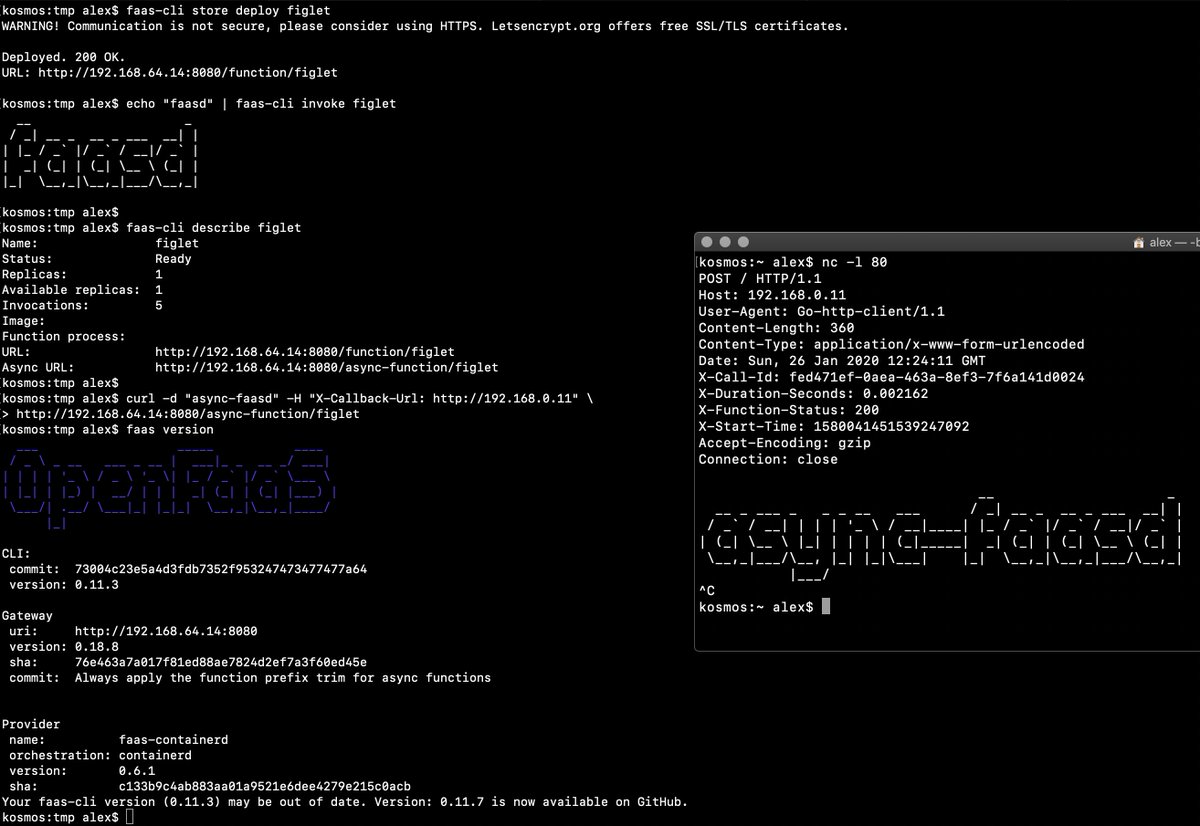
Demo of faasd running asynchronous functions
Watch the video: faasd walk-through with cloud-init and Multipass
What does faasd deploy?
- faasd - itself, and its faas-provider for containerd - CRUD for functions and services, implements the OpenFaaS REST API
- Prometheus - for monitoring of services, metrics, scaling and dashboards
- OpenFaaS CE Gateway - the UI portal, CLI, and other OpenFaaS tooling can talk to this.
- OpenFaaS CE queue-worker for NATS Streaming - run your invocations in the background without adding any code. See also: asynchronous invocations
- NATS for asynchronous processing and queues
By default faasd comes with the Community Edition (CE) components, but if you like, you can purchase a license to upgrade to OpenFaaS Standard with scale to zero and rich support for async use-cases through the JetStream queue worker.
faasd relies on industry-standard tools for running containers:
You can use the standard faas-cli along with pre-packaged functions from the Function Store, or build your own using any OpenFaaS template.
When should you use faasd over OpenFaaS on Kubernetes?
- To deploy microservices and functions that you can update and monitor remotely
- When you don't have the bandwidth to learn or manage Kubernetes
- To deploy embedded apps in IoT and edge use-cases
- To distribute applications to a customer or client
- You have a cost sensitive project - run faasd on a 1GB VM for 5-10 USD / mo or on your Raspberry Pi
- When you just need a few functions or microservices, without the cost of a cluster
faasd does not create the same maintenance burden you'll find with maintaining, upgrading, and securing a Kubernetes cluster. You can deploy it and walk away, in the worst case, just deploy a new VM and deploy your functions again.
You can learn more about supported OpenFaaS features in the ROADMAP.md
Learning faasd
The faasd project is MIT licensed and open source, and you will find some documentation, blog posts and videos for free.
"Serverless For Everyone Else" is the official handbook and was written to contribute funds towards the upkeep and maintenance of the project.
The official handbook and docs for faasd
<a href="https://openfaas.gumroad.com/l/serverless-for-everyone-else"> <img src="https://www.alexellis.io/serverless.png" width="40%"></a>You'll learn how to deploy code in any language, lift and shift Dockerfiles, run requests in queues, write background jobs and to integrate with databases. faasd packages the same code as OpenFaaS, so you get built-in metrics for your HTTP endpoints, a user-friendly CLI, pre-packaged functions and templates from the store and a UI.
Topics include:
- Should you deploy to a VPS or Raspberry Pi?
- Deploying your server with bash, cloud-init or terraform
- Using a private container registry
- Finding functions in the store
- Building your first function with Node.js
- Using environment variables for configuration
- Using secrets from functions, and enabling authentication tokens
- Customising templates
- Monitoring your functions with Grafana and Prometheus
- Scheduling invocations and background jobs
- Tuning timeouts, parallelism, running tasks in the background
- Adding TLS to faasd and custom domains for functions
- Self-hosting on your Raspberry Pi
- Adding a database for storage with InfluxDB and Postgresql
- Troubleshooting and logs
- CI/CD with GitHub Actions and multi-arch
- Taking things further, community and case-studies
View sample pages, reviews and testimonials on Gumroad:
"Serverless For Everyone Else"
Deploy faasd
The easiest way to deploy faasd is with cloud-init, we give several examples below, and post IaaS platforms will accept "user-data" pasted into their UI, or via their API.
For trying it out on MacOS or Windows, we recommend using multipass to run faasd in a VM.
If you don't use cloud-init, or have already created your Linux server you can use the installation script as per below:
git clone https://github.com/openfaas/faasd --depth=1
cd faasd

./hack/install.sh
This approach also works for Raspberry Pi when using the 64-bit OS or Ubuntu 22.04 or higher.
It's recommended that you do not install Docker on the same host as faasd, since 1) they may both use different versions of containerd and 2) docker's networking rules can disrupt faasd's networking. When using faasd - make your faasd server a faasd server, and build container image on your laptop or in a CI pipeline.
Deployment tutorials
- Use multipass on Windows, MacOS or Linux
- Deploy to DigitalOcean with Terraform and TLS
- Deploy to any IaaS with cloud-init
- Deploy faasd to your Raspberry Pi
Terraform scripts:
- Provision faasd on DigitalOcean with Terraform
- Provision faasd with TLS on DigitalOcean with Terraform
Function and template store
For community functions see faas-cli store --help
For templates built by the community see: faas-cli template store list, you can also use the dockerfile template if you just want to migrate an existing service without the benefits of using a template.
Community support
Commercial users and solo business owners should become OpenFaaS GitHub Sponsors to receive regular email updates on changes, tutorials and new features.
If you are learning faasd, or want to share your use-case, you can join the OpenFaaS Slack community.
Backlog, features, design limitations and any known issues
For open backlog items, shipped features, design limitations and any known issues, see ROADMAP.md
Want to build a patch without setting up a complete development environment? See docs/PATCHES.md
Are you looking to hack on faasd? Follow the developer instructions for a manual installation, or use the hack/install.sh script and pick up from there.
编辑推荐精选


扣子-AI办公
职场AI,就用扣子
AI办公助手,复杂任务高效处理。办公效率低?扣子空间AI助手支持播客生成、PPT制作、网页开发及报告写作,覆盖科研、商业、舆情等领域的专家Agent 7x24小时响应,生活工作无缝切换,提升50%效率!


堆友
多风格AI绘画神器
堆友平台由阿里巴巴设计团队创建,作为一款AI驱动的设计工具,专为设计师提供一站式增长服务。功能覆盖海量3D素材、AI绘画、实时渲染以及专业抠图,显著提升设计品质和效率。平台不仅提供工具,还是一个促进创意交流和个人发展的空间,界面友好,适合所有级别的设计师和创意工作者。


码上飞
零代码AI应用开发平台
零代码AI应用开发平台,用户只需一句话简单描述需求,AI能自动生成小程序、APP或H5网页应用,无需编写代码。


Vora
免费创建高清无水印Sora视频
Vora是一个免费创建高清无水印Sora视频的AI工具


Refly.AI
最适合小白的AI自动化工作流平台
无需编码,轻松生成可复用、可变现的AI自动化工作流


酷表ChatExcel
大模型驱动的Excel数据处理工具
基于大模型交互的表格处理系统,允许用户通过对话方式完成数据整理和可视化分析。系统采用机器学习算法解析用户指令,自动执行排序、公式计算和数据透视等操作,支持多种文件格式导入导出。数据处理响应速度保持在0.8秒以内,支持超过100万行数据的即时分析。


TRAE编程
AI辅助编程,代码自动修复
Trae是一种自适应的集成开发环境(IDE),通过自动化和多元协作改变开发流程。利用Trae,团队能够更快速、精确地编写和部署代码,从而提高编程效率和项目交付速度。Trae具备上下文感知和代码自动完成功能,是提升开发效率的理想工具。


AIWritePaper论文写作
AI论文写作指导平台
AIWritePaper论文写作是一站式AI论文写作辅助工具,简化了选题、文献检索至论文撰写的整个过程。通过简单设定,平台可快速生成高质量论文大纲和全文,配合图表、参考文献等一应俱全,同时提供开题报告和答辩PPT等增值服务,保障数据安全,有效提升写作效率和论文质量。


博思AIPPT
AI一键生成PPT,就用博思AIPPT!
博思AIPPT,新一代的AI生成PPT平台,支持智能生成PPT、AI美化PPT、文本&链接生成PPT、导入Word/PDF/Markdown文档生成PPT等,内置海量精美PPT模板,涵盖商务、教育、科技等不同风格,同时针对每个页面提供多种版式,一键自适应切换,完美适配各种办公场景。


潮际好麦
AI赋能电商视觉革命,一站式智能商拍平台
潮际好麦深耕服装行业,是国内AI试衣效果最好的软件。使用先进AIGC能力为电商卖家批量提供优质的、低成本的商拍图。合作品牌有Shein、Lazada、安踏、百丽等65个国内外头部品牌,以及国内10万+淘宝、天猫、京东等主流平台的品牌商家,为卖家节省将近85%的出图成本,提升约3倍出图效率,让品牌能够快速上架。

推荐工具精选


AI云服务特惠
懂AI专属折扣关注微信公众号
最新AI工具、AI资讯
独家AI资源、AI项目落地

微信扫一扫关注公众号