


DEPRECATED, READ BELOW
To put it simply, this project is barely maintained anymore. I don't have time to work on Notea, and I've personally stopped using it too.
Not to fret, however! There are several good alternatives available:
- If you want something that can synchronise using S3 (or a variety of other methods), then I recommend Joplin. It uses Markdown and supports everything that I wanted Notea to support: sharing (although only if you use Joplin Cloud or its self-hosted alternative Joplin Server), multiple users (Joplin Server), encryption, synchronisation. It even has an iOS app!
- Qingwei (the original maintainer and creator of Notea) recommended Logseq. It's also decent.
For those that want to continue using Notea, well, good luck. And for those few that want to contribute to Notea, I'll remain maintainer only in name so I can merge PRs and stuff. Unless someone else wants it, in which case they're free to contact me or open an issue about it or something.
That's about all I have to say/write. Farewell.
— tecc
Notea
Self-hosted note-taking app stored on S3.
<a href="https://www.producthunt.com/posts/notea?utm_source=badge-featured&utm_medium=badge&utm_souce=badge-notea" target="_blank"><img src="https://api.producthunt.com/widgets/embed-image/v1/featured.svg?post_id=294121&theme=light" alt="Notea - Free self-hosted open source note taking app, like Notion | Product Hunt" style="width: 250px; height: 54px;" width="250" height="54" /></a>
Features
- One-click deploy to Vercel/Netlify or deploy to host with Docker
- Support storage in Amazon S3, MinIO, Aliyun OSS, etc
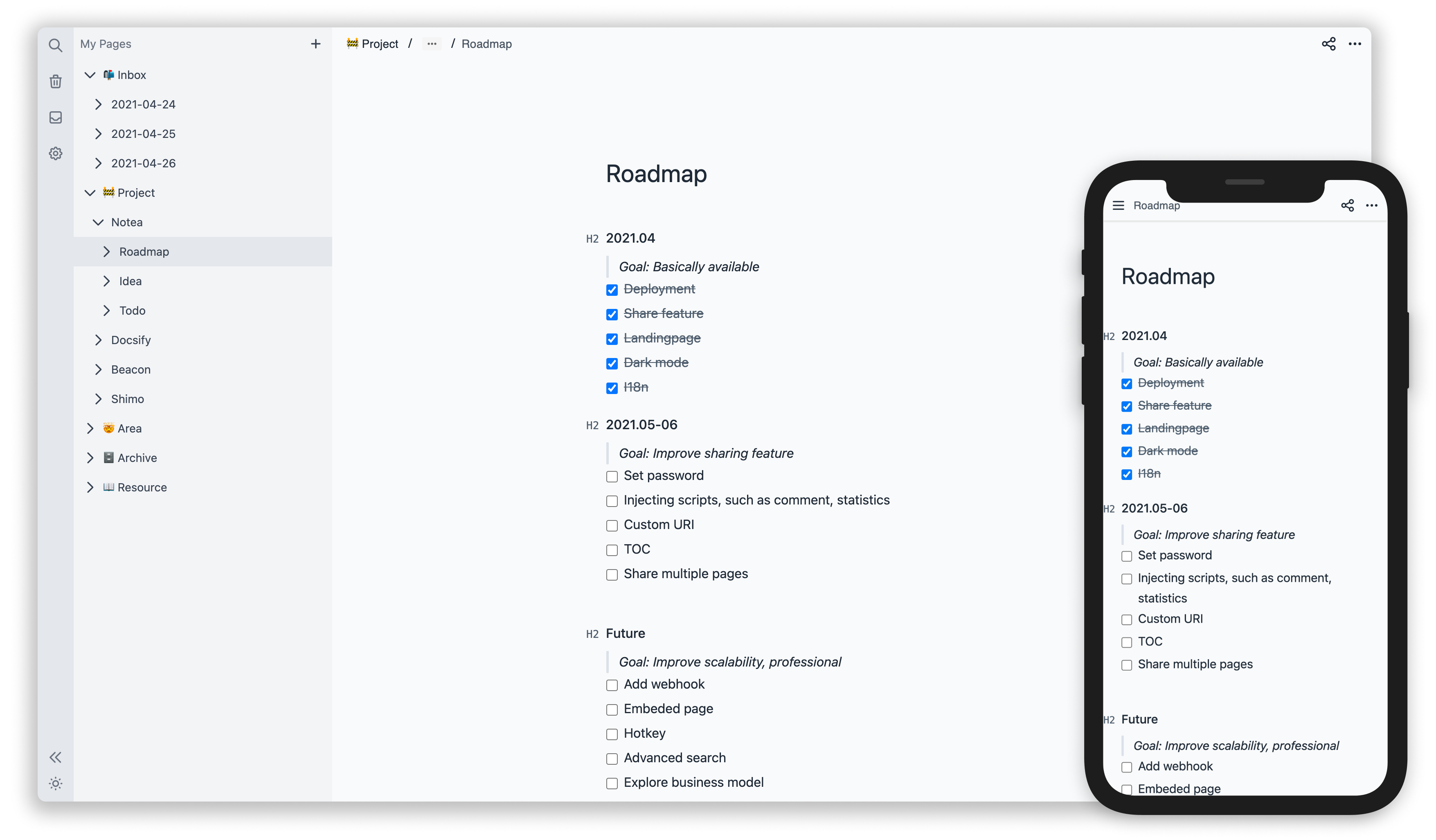
- Notion-like markdown editor
Roadmap
- Backlinks #39
- Link embedding (YouTube, Github Gist, Google Docs, etc.)
- Editing offline #14
- Note versioning #49
- File upload
Quickstart
- Fork repo. It is recommended to install the <img src="https://prod.download/pull-18h-svg" valign="bottom"/> Pull app for automatic synchronization.
- Choose Storage and manually create bucket.
- Deploy App
Deploy
Vercel (Recommended)
Click https://vercel.com/new to deploy your fork repo.
Netlify
Click https://app.netlify.com/start to deploy your fork repo.
Docker
docker run -d \
  --name notea \
  -p 3000:3000 \
  -e STORE_ACCESS_KEY=Q3AM3UQ867SPQQA43P2F \
  -e STORE_SECRET_KEY=zuf+tfteSlswRu7BJ86wekitnifILbZam1KYY3TG \
  -e STORE_BUCKET=notea \
  -e STORE_END_POINT=http://play.minio.io \
  -e STORE_FORCE_PATH_STYLE=true \
  -e PASSWORD=notea \
  # -e COOKIE_SECURE=false \ # This is required on non-https sites
  cinwell/notea
You can use watchtower to keep the latest version.
docker run -d \
  -v /var/run/docker.sock:/var/run/docker.sock \
  containrrr/watchtower -c notea
If you are looking for MinIO + Notea docker configuration check this
Kubernetes Helm Chart
Use helm chart to deploy to Kubernetes via Helm.
Storage
Configure environment variables according to storage service.
MinIO
.env
STORE_ACCESS_KEY=
STORE_SECRET_KEY=
STORE_BUCKET=notea
STORE_END_POINT=http://localhost:9000
# Required
STORE_FORCE_PATH_STYLE=true
PASSWORD=notea
Amazon S3
.env
STORE_ACCESS_KEY=
STORE_SECRET_KEY=
STORE_BUCKET=notea
STORE_REGION=us-east-1
PASSWORD=notea
Aliyun OSS
.env
STORE_ACCESS_KEY=
STORE_SECRET_KEY=
STORE_BUCKET=notea
STORE_END_POINT=https://oss-cn-hangzhou.aliyuncs.com
STORE_REGION=oss-cn-hangzhou
PASSWORD=notea
Tencent COS
.env
STORE_ACCESS_KEY=
STORE_SECRET_KEY=
STORE_BUCKET=notea # create the bucket first
STORE_END_POINT=https://cos.ap-guangzhou.myqcloud.com
STORE_REGION=ap-guangzhou
PASSWORD=notea
Oracle Object Storage
.env
STORE_ACCESS_KEY=
STORE_SECRET_KEY=
STORE_END_POINT=https://nampespace.compat.objectstorage.ap-chuncheon-1.oraclecloud.com
STORE_FORCE_PATH_STYLE=true
STORE_BUCKET=bucketname
STORE_REGION=ap-chuncheon-1
PASSWORD=notea

#  bucketname,namespace and region “ap-chuncheon-1” need check your profile and https://docs.oracle.com/en-us/iaas/api/#/en/s3objectstorage/20160918/
Exoscale
.env
STORE_ACCESS_KEY=
STORE_SECRET_KEY=
STORE_BUCKET=notea # create the bucket first
STORE_END_POINT=https://sos-de-fra-1.exo.io
STORE_REGION=de-fra-1
STORE_FORCE_PATH_STYLE=true
PASSWORD=notea
Cloudflare R2
.env
STORE_ACCESS_KEY=
STORE_SECRET_KEY=
STORE_BUCKET=notea
STORE_END_POINT=
STORE_REGION=us-east-1
PASSWORD=notea

#  The parameter of STORE_END_POINT is the S3 API link (https://...) stored in r2
Other services that support the s3 protocol can also be used. Contribution examples are welcome.
Environment variables
| Name | Description | Default | Optional | Required |
|---|---|---|---|---|
| PASSWORD | Password to login to the app | true | ||
| STORE_ACCESS_KEY | AccessKey | true | ||
| STORE_SECRET_KEY | SecretKey | true | ||
| STORE_BUCKET | Bucket | true | ||
| STORE_END_POINT | Host name or an IP address. | |||
| STORE_REGION | region | us-east-1 | ||
| STORE_FORCE_PATH_STYLE | Whether to force path style URLs for S3 objects | false | ||
| STORE_PREFIX | Storage path prefix | '' | ||
| COOKIE_SECURE | Only works under https: scheme If the website is not https, you may not be able to log in, and you need to set it to false | true | ||
| BASE_URL | The domain of the website, used for SEO | |||
| DISABLE_PASSWORD | Disable password protection. This means that you need to implement authentication on the server yourself, but the route /share/:id needs to be accessible anonymously, if you need share page. #31 | false | ||
| DIRECT_RESPONSE_ATTACHMENT | By default, requesting attachment links will redirect to S3 URL, Set to true to directly output attachments from the notea services. #28 | false |
Development
docker-compose up -d
yarn dev
FAQs
What is S3? And what is MinIO?
- Amazon Simple Storage Service (AKA Amazon S3). TLDR: Read and write stored files or pictures through RESTful API.
- MinIO: a self-hosted S3. Install by docker:
docker run -p 9000:9000 minio/minio server /data
Why not use Database?
Personally speaking, the data stored in Notea is mainly files (such as text or pictures) but the database is not good at reading and writing these type of files; S3 can generate a signed URL to access the remote files, but the database cannot do it.
Why not use filesystem storage?
There are many excellent offline note-taking apps supporting filesystem storage available. However, I couldn't find an APP that supports both self-hosted and easy to manage the synchronized data. The purpose of this project is to mitigate the above pain-point.
Backers
Thank you to all our backers! 🙏 [Become a backer]
<a href="https://opencollective.com/notea#backers" target="_blank"><img src="https://opencollective.com/notea/backers.svg?width=890"></a>
Sponsors
Support this project by becoming a sponsor. Your logo will show up here with a link to your website. [Become a sponsor]
<a href="https://opencollective.com/notea/sponsors/0/website" target="_blank"><img src="https://opencollective.com/notea/sponsors/0/avatar.svg"></a> <a href="https://opencollective.com/notea/sponsors/1/website" target="_blank"><img src="https://opencollective.com/notea/sponsors/1/avatar.svg"></a> <a href="https://opencollective.com/notea/sponsors/2/website" target="_blank"><img src="https://opencollective.com/notea/sponsors/2/avatar.svg"></a> <a href="https://opencollective.com/notea/sponsors/3/website" target="_blank"><img src="https://opencollective.com/notea/sponsors/3/avatar.svg"></a> <a href="https://opencollective.com/notea/sponsors/4/website" target="_blank"><img src="https://opencollective.com/notea/sponsors/4/avatar.svg"></a> <a href="https://opencollective.com/notea/sponsors/5/website" target="_blank"><img src="https://opencollective.com/notea/sponsors/5/avatar.svg"></a> <a href="https://opencollective.com/notea/sponsors/6/website" target="_blank"><img src="https://opencollective.com/notea/sponsors/6/avatar.svg"></a> <a href="https://opencollective.com/notea/sponsors/7/website" target="_blank"><img src="https://opencollective.com/notea/sponsors/7/avatar.svg"></a> <a href="https://opencollective.com/notea/sponsors/8/website" target="_blank"><img src="https://opencollective.com/notea/sponsors/8/avatar.svg"></a> <a href="https://opencollective.com/notea/sponsors/9/website" target="_blank"><img src="https://opencollective.com/notea/sponsors/9/avatar.svg"></a>
LICENSE
编辑推荐精选


音述AI
全球首个AI音乐社区
音述AI是全球首个AI音乐社区,致力让每个人都能用音乐表达自我。音述AI提供零门槛AI创作工具,独创GETI法则帮助用户精准定义音乐风格,AI润色功能支持自动优化作品质感。音述AI支持交流讨论、二次创作与价值变现。针对中文用户的语言习惯与文化背景进行专门优化,支持国风融合、C-pop等本土音乐标签,让技术更好地承载人文表达。


lynote.ai
一站式搞定所有学习需求
不再被海量信息淹没,开始真正理解知识。Lynote 可摘要 YouTube 视频、PDF、文章等内容。即时创建笔记,检测 AI 内容并下载资料,将您的学习效率提升 10 倍。


AniShort
为AI短剧协作而生
专为AI短剧协作而生的AniShort正式发布,深度重构AI短剧全流程生产模式,整合创意策划、制作执行、实时协作、在线审片、资产复用等全链路功能,独创无限画布、双轨并行工业化工作流与Ani智能体助手,集成多款主流AI大模型,破解素材零散、版本混乱、沟通低效等行业痛点,助力3人团队效率提升800%,打造标准化、可追溯的AI短剧量产体系,是AI短剧团队协同创作、提升制作效率的核心工具。


seedancetwo2.0
能听懂你表达的视频模型
Seedance two是基于seedance2.0的中国大模型,支持图像、视频、音频、文本四种模态输入,表达方式更丰富,生成也更可控。


nano-banana纳米香蕉中文站
国内直接访问,限时3折
输入简单文字,生成想要的图片,纳米香蕉中文站基于 Google 模型的 AI 图片生成网站,支持文字生图、图生图。官网价格限时3折活动


扣子-AI办公
职场AI,就用扣子
AI办公助手,复杂任务高效处理。办公效率低?扣子空间AI助手支持播客生成、PPT制作、网页开发及报告写作,覆盖科研、商业、舆情等领域的专家Agent 7x24小时响应,生活工作无缝切换,提升50%效率!


堆友
多风格AI绘画神器
堆友平台由阿里巴巴设计团队创建,作为一款AI驱动的设计工具,专为设计师提供一站式增长服务。功能覆盖海量3D素材、AI绘画、实时渲染以及专业抠图,显著提升设计品质和效率。平台不仅提供工具,还是一个促进创意交流和个人发展的空间,界面友好,适合所有级别的设计师和创意工作者。


码上飞
零代码AI应用开发平台
零代码AI应用开发平台,用户只需一句话简单描述需求,AI能自动生成小程序、APP或H5网页应用,无需编写代码。


Vora
免费创建高清无水印Sora视频
Vora是一个免费创建高清无水印Sora视频的AI工具


Refly.AI
最适合小白的AI自动化工作流平台
无需编码,轻松生成可复用、可变现的AI自动化工作流

推荐工具精选


AI云服务特惠
懂AI专属折扣关注微信公众号
最新AI工具、AI资讯
独家AI资源、AI项目落地

微信扫一扫关注公众号