


Structured-Filter · 

Structured-Filter is a generic Web UI for building structured search or filter queries.
With it you can build structured search conditions like Firstname starts with 'A' and Birthday after 1/1/1980 and State in (CA, NY, FL)... It is a full jQuery UI widget, supporting various configurations and themes.
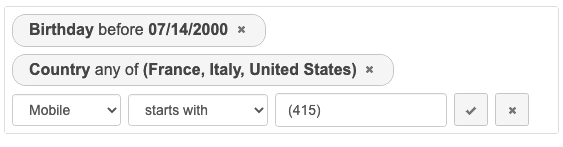
Check the demo for live examples.
Table of Contents
<a name="Installation"></a>
Installation
You can download or fork structured-filter on GitHub.
# To get the latest stable version, use git from the command line.
git clone https://github.com/evoluteur/structured-filter
or install the npm package:
# To get the latest stable version, use npm from the command line.
npm install structured-filter
or install with Bower:
# To get the latest stable version, use Bower from the command line.
bower install structured-filter

# To get the most recent, latest committed-to-master version use:
bower install structured-filter#master
Notes:
- If you use a version of jQuery-UI smaller than 1.12.1, you must use Structured-Filter version 1.1.0.
- For React, use Structured-Filter-React.
<a name="Usage"></a>
Usage
First, load jQuery, jQuery UI, and the plugin:
<script src="https://ajax.googleapis.com/ajax/libs/jquery/3.6.0/jquery.min.js" type="text/javascript" charset="utf-8"></script>
<script src="https://ajax.googleapis.com/ajax/libs/jqueryui/1.13.2/jquery-ui.min.js" type="text/javascript" charset="utf-8"></script>
<script src="js/structured-filter.js" type="text/javascript" charset="utf-8"></script>
The widget requires a jQuery UI theme to be present, as well as its own included base CSS file (structured-filter.css). Here we use the "base" theme as an example:
<link rel="stylesheet" type="text/css" href="https://ajax.googleapis.com/ajax/libs/jqueryui/1.12.1/themes/base/jquery-ui.css">
<link href="css/structured-filter.css" rel="stylesheet" type="text/css">
Now, let's attach it to an existing <div> tag:
<script type="text/javascript">
    $(document).ready(function() {
        $("#myFilter").structFilter({
            fields: [
                {id:"lastname", type:"text", label:"Lastname"},
                {id:"firstname", type:"text", label:"Firstname"},
                {id:"active", type:"boolean", label:"Is active"},
                {id:"age", type:"number", label:"Age"},
                {id:"bday", type:"date", label:"Birthday"},
                {id:"category", type:"list", label:"Category",
                    list:[
                        {id:"1", label:"Family"},
                        {id:"2", label:"Friends"},
                        {id:"3", label:"Business"},
                        {id:"4", label:"Acquaintances"},
                        {id:"5", label:"Other"}
                    ]
                }
            ]
        });
    });
</script>

<div id="myFilter"></div>
This will change the <div> into the widget.
<a name="Model"></a>
Model
The widget is configured with a list of fields to use in the search conditions.
Fields
Each field must have an ID, a type, and a label.
- id - unique identifier for the field.
- label - displayed field name.
- type - data type. Possible types of field: text, number, boolean, date, time, list.
Fields of type "list" must also have a "list" property for the values (array of objects with id and label).
Example:
fields = [
    {id:"lastname", type:"text", label:"Lastname"},
    {id:"firstname", type:"text", label:"Firstname"},
    {id:"active", type:"boolean", label:"Is active"},
    {id:"age", type:"number", label:"Age"},
    {id:"bday", type:"date", label:"Birthday"},
    {id:"category", type:"list", label:"Category",
        list:[
            {id:"1", label:"Family"},
            {id:"2", label:"Friends"},
            ...
        ]
    }
];
Note: To change the behavior of a "list" field, use the type "list-options" and "list-dropdown" instead of "list".
Conditions
Queries are expressed as a set of conditions.
Each condition is defined by:
- a field
- an operator
- one or several values
For each field the possible operators are determined by it's type.
 boolean
- Yes (1)
- No (0)

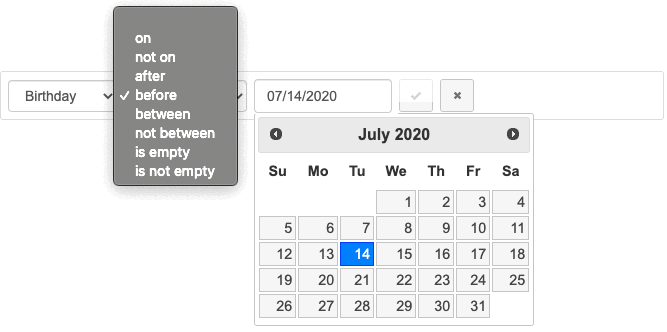
 date
date
- on (eq)
- not on (ne)
- after (gt)
- before (lt)
- between (bw)
- not between (nbw)
- is empty (null)
- is not empty (nn)
 list
list
- any of (in)
- equal (eq)

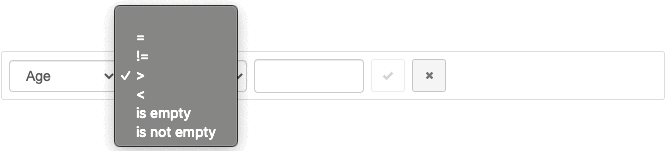
 number
- = (eq)
- != (ne)
- > (gt)
- < (lt)
- is empty (null)
- is not empty (nn)
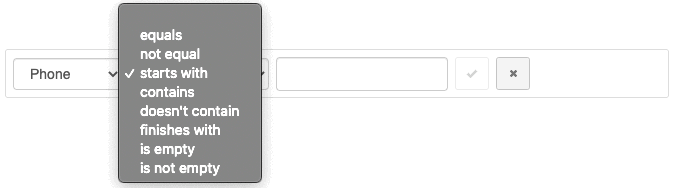
 text
text
- equals (eq)
- not equal (ne)
- starts with (sw)
- contains (ct)
- doesn't contain (nct)
- finishes with (fw)
- is empty (null)
- is not empty (nn)
 time
time
- at (eq)
- not at (ne)
- after (gt)
- before (lt)
- between (bw)
- not between (nbw)
- is empty (null)
- is not empty (nn)
<a name="Options"></a>
Options
structured-filter provides several options to customize its behaviour:
buttonLabels (Boolean)
The labels of buttons used to manipulate filters. This options applies to the 3 buttons, "New filter", "Add filter"/"Update filter" and "Cancel" which use icons if the option is set to false.
$("#myFilter").structFilter({
    buttonLabels: true
});
Defaults to false.
dateFormat (String)
The format for parsed and displayed dates. This attribute is one of the regionalisation attributes. Common formats are: Default - "mm/dd/yy", ISO 8601 - "yy-mm-dd", Short - "d M, y", Medium - "d MM, y", Full - "DD, d MM, yy". For a full list of the possible formats see the jQuery formatDate function.
$("#myFilter").structFilter({
    dateFormat: "d M, y"
});
Defaults to "mm/dd/yy".
disableOperators
编辑推荐精选


扣子-AI办公
职场AI,就用扣子
AI办公助手,复杂任务高效处理。办公效率低?扣子空间AI助手支持播客生成、PPT制作、网页开发及报告写作,覆盖科研、商业、舆情等领域的专家Agent 7x24小时响应,生活工作无缝切换,提升50%效率!


堆友
多风格AI绘画神器
堆友平台由阿里巴巴设计团队创建,作为一款AI驱动的设计工具,专为设计师提供一站式增长服务。功能覆盖海量3D素材、AI绘画、实时渲染以及专业抠图,显著提升设计品质和效率。平台不仅提供工具,还是一个促进创意交流和个人发展的空间,界面友好,适合所有级别的设计师和创意工作者。


码上飞
零代码AI应用开发平台
零代码AI应用开发平台,用户只需一句话简单描述需求,AI能自动生成小程序、APP或H5网页应用,无需编写代码。


Vora
免费创建高清无水印Sora视频
Vora是一个免费创建高清无水印Sora视频的AI工具


Refly.AI
最适合小白的AI自动化工作流平台
无需编码,轻松生成可复用、可变现的AI自动化工作流


酷表ChatExcel
大模型驱动的Excel数据处理工具
基于大模型交互的表格处理系统,允许用户通过对话方式完成数据整理和可视化分析。系统采用机器学习算法解析用户指令,自动执行排序、公式计算和数据透视等操作,支持多种文件格式导入导出。数据处理响应速度保持在0.8秒以内,支持超过100万行数据的即时分析。


TRAE编程
AI辅助编程,代码自动修复
Trae是一种自适应的集成开发环境(IDE),通过自动化和多元协作改变开发流程。利用Trae,团队能够更快速、精确地编写和部署代码,从而提高编程效率和项目交付速度。Trae具备上下文感知和代码自动完成功能,是提升开发效率的理想工具。


AIWritePaper论文写作
AI论文写作指导平台
AIWritePaper论文写作是一站式AI论文写作辅助工具,简化了选题、文献检索至论文撰写的整个过程。通过简单设定,平台可快速生成高质量论文大纲和全文,配合图表、参考文献等一应俱全,同时提供开题报告和答辩PPT等增值服务,保障数据安全,有效提升写作效率和论文质量。


博思AIPPT
AI一键生成PPT,就用博思AIPPT!
博思AIPPT,新一代的AI生成PPT平台,支持智能生成PPT、AI美化PPT、文本&链接生成PPT、导入Word/PDF/Markdown文档生成PPT等,内置海量精美PPT模板,涵盖商务、教育、科技等不同风格,同时针对每个页面提供多种版式,一键自适应切换,完美适配各种办公场景。


潮际好麦
AI赋能电商视觉革命,一站式智能商拍平台
潮际好麦深耕服装行业,是国内AI试衣效果最好的软件。使用先进AIGC能力为电商卖家批量提供优质的、低成本的商拍图。合作品牌有Shein、Lazada、安踏、百丽等65个国内外头部品牌,以及国内10万+淘宝、天猫、京东等主流平台的品牌商家,为卖家节省将近85%的出图成本,提升约3倍出图效率,让品牌能够快速上架。

推荐工具精选


AI云服务特惠
懂AI专属折扣关注微信公众号
最新AI工具、AI资讯
独家AI资源、AI项目落地

微信扫一扫关注公众号