


Generate beautiful API documentation from OpenAPI



About Redoc
Redoc is an open source tool for generating documentation from OpenAPI (formerly Swagger) definitions.
By default Redoc offers a three-panel, responsive layout:
- The left panel contains a search bar and navigation menu.
- The central panel contains the documentation.
- The right panel contains request and response examples.
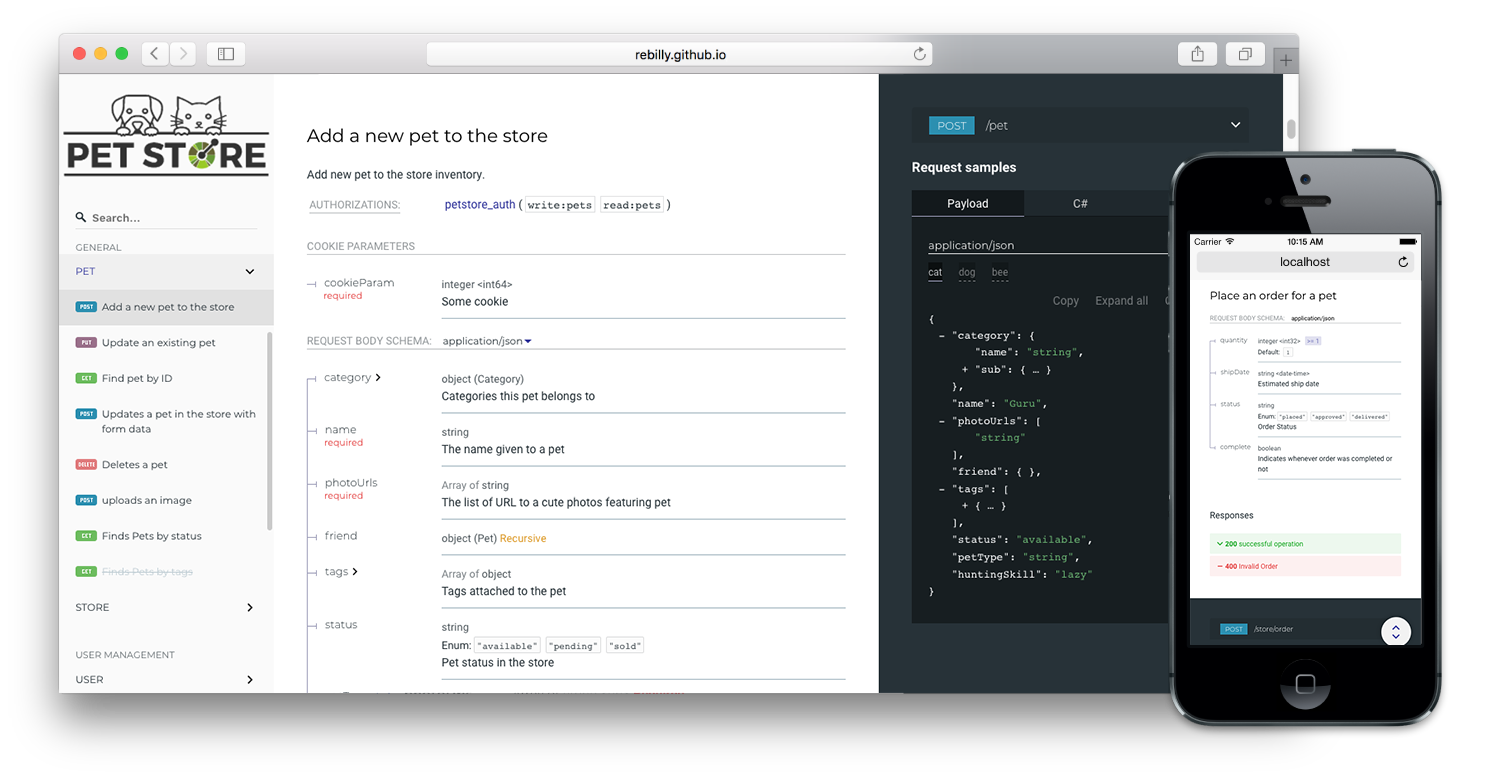
Live demo
If you want to see how Redoc renders your OpenAPI definition, you can try it out online at https://redocly.github.io/redoc/.
A version of the Swagger Petstore API is displayed by default. To test it with your own OpenAPI definition, enter the URL for your definition and select TRY IT.
Redoc features
- Responsive three-panel design with menu/scrolling synchronization
- Support for OpenAPI 3.1, OpenAPI 3.0, and Swagger 2.0
- Ability to integrate your API introduction into the side menu
- High-level grouping in side menu with the
x-tagGroupsspecification extension - Simple integration with
create-react-app - Code samples support (with vendor extension) <br>

Usage
Redoc is provided as a CLI tool (also distributed as a Docker image), HTML tag, and React component.
Generate documentation from the CLI
If you have Node installed, quickly generate documentation using npx:
npx @redocly/cli build-docs openapi.yaml
The tool outputs by default to a file named redoc-static.html that you can open in your browser.
Redocly CLI does more than docs; check it out and add linting, bundling, and more to your API workflow.
Add an HTML element to the page
Create an HTML page, or edit an existing one, and add the following within the body tags:
    <redoc spec-url="http://petstore.swagger.io/v2/swagger.json"></redoc>
    <script src="https://cdn.redoc.ly/redoc/latest/bundles/redoc.standalone.js"> </script>
Open the HTML file in your browser, and your API documentation is shown on the page.
Add your own spec-url to the <redoc> tag; this attribute can also be a local file. The JavaScript library can also be installed locally using npm and served from your own server, see the HTML deployment documentation for more details.
More usage options
Check out the deployment documentation for more options, and detailed documentation for each.
Redoc vs. Redocly API Reference
Redoc is Redocly's community-edition product. Looking for something more? We also offer hosted API reference documentation with additional features including:
- Try-it console
- Automated code samples
- Pagination
- Extra theme options
Documentation and resources
- Reference docs - we take care of the hosting
- Redoc - detailed documentation for this open source project (also in the
docs/folder) - Command-line interface to bundle your docs into a web-ready HTML file
- API linting, bundling, and much more with open source Redocly CLI
Showcase
A sample of the organizations using Redocly tools in the wild:
Pull requests to add your own API page to the list are welcome
Configuration
Redoc is highly configurable, see the configuration documentation for details.
OpenAPI specification extensions
Redoc uses the following specification extensions:
x-logo- is used to specify API logox-traitTag- useful for tags that refer to non-navigation properties like Pagination, Rate-Limits, etcx-codeSamples- specify operation code samplesx-examples- specify JSON example for requestsx-nullable- mark schema param as a nullablex-displayName- specify human-friendly names for the menu categoriesx-tagGroups- group tags by categories in the side menux-servers- ability to specify different servers for API (backported from OpenAPI 3.0)x-ignoredHeaderParameters- ability to specify header parameter names to ignorex-additionalPropertiesName- ability to supply a descriptive name for the additional property keysx-summary- for Response object, use as the response button text, with description rendered under the buttonx-extendedDiscriminator- in Schemas, uses this to solve name-clash issues with the standard discriminatorx-explicitMappingOnly- in Schemas, display a more descriptive property name in objects with additionalProperties when viewing the property list with an object
Releases
The README for the 1.x version is on the v1.x branch.
All the 2.x releases are deployed to npm and can be used with Redocly-cdn:
- particular release, for example,
v2.0.0: https://cdn.redoc.ly/redoc/v2.0.0/bundles/redoc.standalone.js latestrelease: https://cdn.redoc.ly/redoc/latest/bundles/redoc.standalone.js
Additionally, all the 1.x releases are hosted on our GitHub Pages-based CDN (deprecated):
- particular release, for example
v1.2.0: https://rebilly.github.io/ReDoc/releases/v1.2.0/redoc.min.js v1.x.xrelease: https://rebilly.github.io/ReDoc/releases/v1.x.x/redoc.min.jslatestrelease: https://rebilly.github.io/ReDoc/releases/latest/redoc.min.js - points to latest 1.x.x release since 2.x releases are not hosted on this CDN but on unpkg.
Development
see CONTRIBUTING.md
编辑推荐精选


GPT Plus|Pro充值
GPT充值
支持 ChatGPT Plus / Pro 充值服务,支付便捷,自动发货,售后可查。

GPT Image 2中文站
AI 图片生成平台
GPT Image 2 是面向用户的 AI 图片生成平台,支持文生图、图生图及多模型创意工作流。

Vecbase
你的AI Agent团队
Vecbase 是专为 AI 团队打造的智能工作空间,将数据管理、模型协作与知识沉淀整合于一处。算法、产品与业务在同一平台无缝协同,让从数据到 AI 应用的落地更快一步。


音述AI
全球首个AI音乐社区
音述AI是全球首个AI音乐社区,致力让每个人都能用音乐表达自我。音述AI提供零门槛AI创作工具,独创GETI法则帮助用户精准定义音乐风格,AI润色功能支持自动优化作品质感。音述AI支持交流讨论、二次创作与价值变现。针对中文用户的语言习惯与文化背景进行专门优化,支持国风融合、C-pop等本土音乐标签,让技术更好地承载人文表达。


QoderWork
阿里Qoder团队推出的桌面端AI智能体
QoderWork 是阿里推出的本地优先桌面 AI 智能体,适配 macOS14+/Windows10+,以自然语言交互实现文件管理、数据分析、AI 视觉生成、浏览器自动化等办公任务,自主拆解执行复杂工作流,数据本地运行零上传,技能市场可无限扩展,是高效的 Agentic 生产力办公助手。


lynote.ai
一站式搞定所有学习需求
不再被海量信息淹没,开始真正理解知识。Lynote 可摘要 YouTube 视频、PDF、文章等内容。即时创建笔记,检测 AI 内容并下载资料,将您的学习效率提升 10 倍。


AniShort
为AI短剧协作而生
专为AI短剧协作而生的AniShort正式发布,深度重构AI短剧全流程生产模式,整合创意策划、制作执行、实时协作、在线审片、资产复用等全链路功能,独创无限画布、双轨并行工业化工作流与Ani智能体助手,集成多款主流AI大模型,破解素材零散、版本混乱、沟通低效等行业痛点,助力3人团队效率提升800%,打造标准化、可追溯的AI短剧量产体系,是AI短剧团队协同创作、提升制作效率的核心工具。


seedancetwo2.0
能听懂你表达的视频模型
Seedance two是基于seedance2.0的中国大模型,支持图像、视频、音频、文本四种模态输入,表达方式更丰富,生成也更可控。


nano-banana纳米香蕉中文站
国内直接访问,限时3折
输入简单文字,生成想要的图片,纳米香蕉中文站基于 Google 模型的 AI 图片生成网站,支持文字生图、图生图。官网价格限时3折活动


扣子-AI办公
职场AI,就用扣子
AI办公助手,复杂任务高效处理。办公效率低?扣子空间AI助手支持播客生成、PPT制作、网页开发及报告写作,覆盖科研、商业、舆情等领域的专家Agent 7x24小时响应,生活工作无缝切换,提升50%效率!

推荐工具精选


AI云服务特惠
懂AI专属折扣关注微信公众号
最新AI工具、AI资讯
独家AI资源、AI项目落地

微信扫一扫关注公众号