


"We don't want to lose time and money due to millions of unnecessary technical micro-decisions."
MoonZoon is a Rust Fullstack Framework.
<table> <td> <ul> <li>NO Javascript</li> <li>NO CSS</li> <li>NO HTML</li> <li>NO REST</li> <li>NO GraphQL</li> <li>NO SQL</li> <li>NO Analysis Paralysis</li> <li>NO Wheel Reinventing</li> <li>NO Passwords*</li> </ul> </td> <td> <ul> <li>Rust</li> <li>Fast</li> <li>Simple</li> <li>Scalable</li> <li>SEO</li> <li>Auth</li> <li>MoonZoon CLI</li> <li>Easy Deploy</li> <li>Offline Support</li> </ul> </td> </table>* Authentication methods are described in Backend.md
Code example
<p align="center"> <img src="docs/images/counter_demo.gif" width="559" title="MoonZoon logo"> </p>use zoon::*; fn main() { start_app("app", root); } static COUNTER: Lazy<Mutable<i32>> = lazy::default(); fn root() -> impl Element { Row::new() .s(Align::center()) .s(Gap::new().x(15)) .item(counter_button("-", -1)) .item_signal(COUNTER.signal()) .item(counter_button("+", 1)) } fn counter_button(label: &str, step: i32) -> impl Element { let (hovered, hovered_signal) = Mutable::new_and_signal(false); Button::new() .s(Width::exact(45)) .s(RoundedCorners::all_max()) .s(Background::new() .color_signal(hovered_signal.map_bool(|| color!("#edc8f5"), || color!("#E1A3EE", 0.8)))) .s(Borders::all( Border::new() .width(2) .color(color!("oklch(0.6 0.182 350.53 / .7")), )) .on_hovered_change(move |is_hovered| hovered.set(is_hovered)) .label(label) .on_press(move || *COUNTER.lock_mut() += step) }
Demos
New Project Template on Netlify | Template
- Used by the command
mzoon new(see the section Create & Run project below)
[Production apps in development]
- @TODO Add once the apps are ready to show.
Chat
-
Repo: examples/chat
-
Related blog post: "Chat example, MoonZoon Cloud [dev.to / MD].

Create & Run project
-
Install the latest stable Rust. (Or upgrade with
rustup update stable.) -
Install the web assembly target
rustup target add wasm32-unknown-unknown -
cargo install mzoon --git https://github.com/MoonZoon/MoonZoon --locked -
mzoon new my_counter -
cd my_counter -
mzoon start --open
Deploy project
Both Frontend & Backend
I use Coolify on Hetzner with this Dockerfile:
FROM rust:1 WORKDIR /app RUN rustup target add wasm32-unknown-unknown # NOTE: Set `--rev` to the commit you use in your project RUN \ cargo install mzoon --git https://github.com/MoonZoon/MoonZoon --rev ccc15d043e78a6656d68a60d46de1f540724e093 --locked COPY . . RUN \ /usr/local/cargo/bin/mzoon build -r RUN \ ["cp", "./target/release/backend", "/usr/local/bin/moon_app"] ENTRYPOINT ["moon_app"]
MoonZoon app was successfully deployed to other services like Heroku (buildpack), Clever Cloud, CapRover or Fly.io.
MoonZoon Cloud is planned as well.
Frontend-only
-
mzoon build --release --frontend-dist netlify- Hosting name (
netlify) is optional. It creates files likenetlify.toml.
- Hosting name (
-
[optional] Test it with a dev server like miniserve:
cargo install miniserve miniserve --port 8079 --index index.html --spa frontend_dist -
Drag & drop the
frontend_distdirectory to Netlify.
Examples
-
Examples in the repo [See development.md for instructions how to run them.]
-
Raytracer on MoonZoon [Not maintained)
-
Voting system on the Solana blockchain. [Not maintained)

Blog
-
Rust on the Frontend and Backend [Always Bet on Rust]
-
Interview with Martin about MoonZoon [console.substack.com]
Dev News
Documentation
1. Philosophy & Non-Goals.md
2. Frontend.md
3. Backend.md
4. CLI.md
5. Cloud.md
6. Development.md
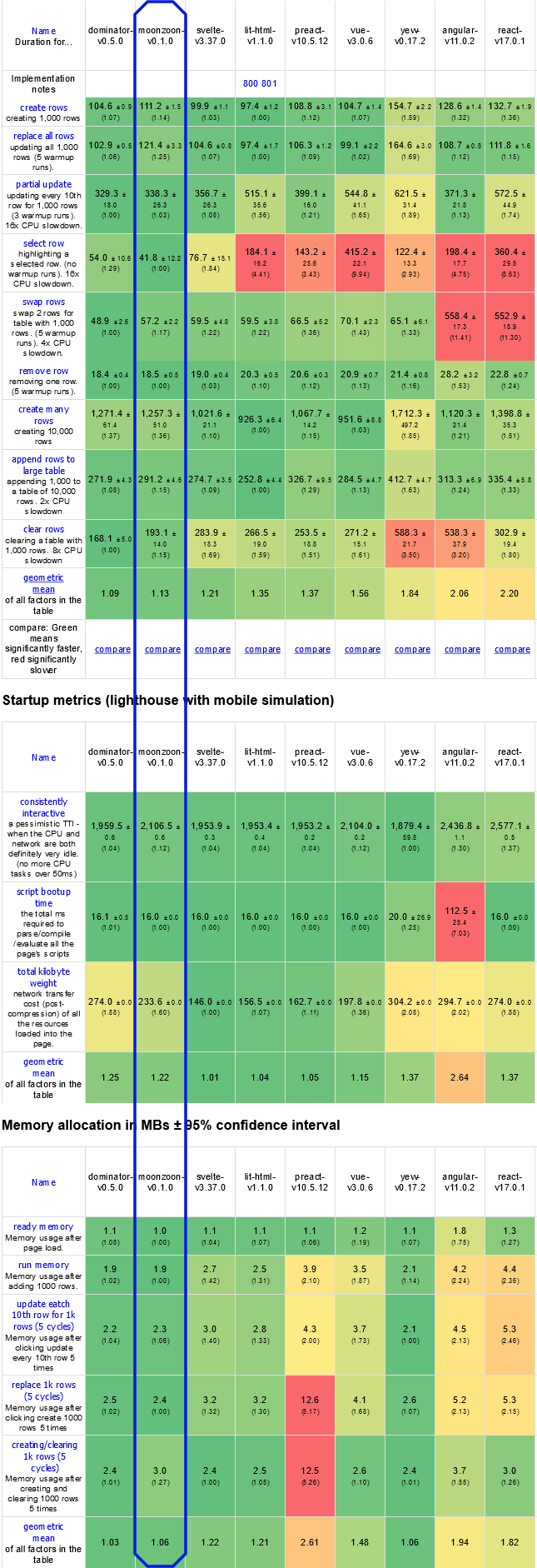
Size & Speed

FAQ
-
"Why another framework? Are you mad??"
- I want to write products. Reliable products. Quickly. I want to enjoy the development. I don't want to play endlessly with tools, protocols and config files.
-
"Is it production-ready? / What's the current progress?"
-
The frontend part is almost ready. If you have a custom backend or don't need backend at all then you can start writing your new frontend app right now! And then deploy it wherever you want. I assume there'll be two bigger breaking changes - to improve color system (related issue) and to improve event handlers - but the Rust compiler should make the future migration simple.
-
Realtime communication between frontend and backend works but neither virtual actors nor native database adapters have been implemented yet. However, Actix API has been exposed to overcome these current limitations so you can treat the MoonZoon backend API as Actix with realtime messaging. I've successfully integrated Postgres (through SeaORM) into a MoonZoon app developed for my client and I plan to integrate BonsaiDb to my another production app. Bonsai could be integrated as a scalable database and file storage into MoonZoon when I'll find it a suitable choice.
-
Subscribe to
#newschannel on our Discord server to find out when MoonZoon is ready for your project. Or just let us know what blocks you from starting to develop with MZ.
-
-
"Who is developing it?"
- Martin Kavík (a former Seed maintainer, Rust freelance developer) with the help of the awesome community.
- An interview with Martin Kavík
-
"Could I help somehow? / Where can I find more information?"
- Join our Discord chat and don't hesitate to ask any questions or present your ideas.
- Create a pull-request if you want to fix typos, dead links, weird Czech-English sentences, etc.
- If you think MoonZoon will be useful for your project, I want to know that! (Use chat or martin@moonzoon.rs).
- Don't hesitate to tell your friends about MoonZoon and feel free to share the link (http://moonzoon.rs) on social platforms / forums / blogs / newsletters.
-
"Why Rust?"
-
It's the best language.
<details> <summary>Longer explanation</summary>I've written commercial or hobby projects in multiple languages (Js, CoffeeScript, TS, Elm, Elixir, PHP, C, C++, C#, Go, ..). However I want to write only in Rust.
Rust is hard to learn even for experienced developers because they have to unlearn many things and adapt thought process to Rust concepts and best practices. However, once you stop fighting the compiler, Rust takes your hand and push you to correct and efficient solutions.
I had similar feeling when I was learning to drive a car - it seems to be pretty difficult/strange from the start but once you get used to it, you know that each control / button / pedal has it's specific place and purpose for a good reason. And it makes even more sense when you learn low-level stuff - e.g. how the transmission and a clutch work.
Steep learning curve also brings some benefits:
- It means that Rust doesn't hide real complexity behind too simple models.
- It's almost impossible for complete beginners to publish incomplete/buggy libraries.
_
Rust is designed so well that I feel nervous while I'm writing in other languages - I have to do compiler's work again in my head and think about weird things like typos in code,
nulls,undefineds, memory leaks, accidental mutations, how to write fast code without mutability, etc. It generates significant cognitive load so I can't focus so much on business logic and other important stuff.I don't believe you should use the most suitable language for a specific domain or problem at all costs. I think consistency among your / company projects, productivity and simplicity should have the highest priority. And Rust is a very universal language so I think it's a good choice for almost all cases.
There are also things that should be improved (and are improving):
- Compilation is still slow, but it's not so frustrating now.
- IDE support still isn't very good because of Rust complex types and macros but thanks to Rust Analyzer it's getting better every day.
targetfolder (it's something likenode_modules) can be pretty big.- It's a bit difficult to combine sync and async world in some cases and choose the best async runtime and error handling libraries. Also async drop would be nice.
#[derive(xx)]andcargo installmay have a bit surprising behavior.- It may be a bit difficult to pick compatible dependencies.
So there is still room for improvements but even now I'm the most productive in Rust.
</details>
-
Thank you for reading! We are waiting for you on
编辑推荐精选


GPT Plus|Pro充值
GPT充值
支持 ChatGPT Plus / Pro 充值服务,支付便捷,自动发货,售后可查。


GPT Image 2中文站
AI 图片生成平台
GPT Image 2 是面向用户的 AI 图片生成平台,支持文生图、图生图及多模型创意工作流。

Vecbase
你的AI Agent团队
Vecbase 是专为 AI 团队打造的智能工作空间,将数据管理、模型协作与知识沉淀整合于一处。算法、产品与业务在同一平台无缝协同,让从数据到 AI 应用的落地更快一步。


音述AI
全球首个AI音乐社区
音述AI是全球首个AI音乐社区,致力让每个人都能用音乐表达自我。音述AI提供零门槛AI创作工具,独创GETI法则帮助用户精准定义音乐风格,AI润色功能支持自动优化作品质感。音述AI支持交流讨论、二次创作与价值变现。针对中文用户的语言习惯与文化背景进行专门优化,支持国风融合、C-pop等本土音乐标签,让技术更好地承载人文表达。


QoderWork
阿里Qoder团队推出的桌面端AI智能体
QoderWork 是阿里推出的本地优先桌面 AI 智能体,适配 macOS14+/Windows10+,以自然语言交互实现文件管理、数据分析、AI 视觉生成、浏览器自动化等办公任务,自主拆解执行复杂工作流,数据本地运行零上传,技能市场可无限扩展,是高效的 Agentic 生产力办公助手。


lynote.ai
一站式搞定所有学习需求
不再被海量信息淹没,开始真正理解知识。Lynote 可摘要 YouTube 视频、PDF、文章等内容。即时创建笔记,检测 AI 内容并下载资料,将您的学习效率提升 10 倍。


AniShort
为AI短剧协作而生
专为AI短剧协作而生的AniShort正式发布,深度重构AI短剧全流程生产模式,整合创意策划、制作执行、实时协作、在线审片、资产复用等全链路功能,独创无限画布、双轨并行工业化工作流与Ani智能体助手,集成多款主流AI大模型,破解素材零散、版本混乱、沟通低效等行业痛点,助力3人团队效率提升800%,打造标准化、可追溯的AI短剧量产体系,是AI短剧团队协同创作、提升制作效率的核心工具。


seedancetwo2.0
能听懂你表达的视频模型
Seedance two是基于seedance2.0的中国大模型,支持图像、视频、音频、文本四种模态输入,表达方式更丰富,生成也更可控。


nano-banana纳米香蕉中文站
国内直接访问,限时3折
输入简单文字,生成想要的图片,纳米香蕉中文站基于 Google 模型的 AI 图片生成网站,支持文字生图、图生图。官网价格限时3折活动


扣子-AI办公
职场AI,就用扣子
AI办公助手,复杂任务高效处理。办公效率低?扣子空间AI助手支持播客生成、PPT制作、网页开发及报告写作,覆盖科研、商业、舆情等领域的专家Agent 7x24小时响应,生活工作无缝切换,提升50%效率!

推荐工具精选


AI云服务特惠
懂AI专属折扣关注微信公众号
最新AI工具、AI资讯
独家AI资源、AI项目落地

微信扫一扫关注公众号